What Is Astro?
Getting to know Astro, a web framework that prioritizes content and performance without sacrificing developer flexibility.
So here’s the story.
I used Next.js for quite a while — side projects, experiments, even some more serious stuff. Comfortable with it. Solid SSR, great docs, big community.
Then one day a friend — someone who’s been teaching me a lot about tech — asked: “Have you tried Astro yet?”
Astro? Honestly, I’d never even heard of it.
“A framework for building websites. But it outputs pure HTML. Doesn’t send JavaScript unless you actually need it.”
My first reaction: skeptical. A modern framework that just outputs HTML? Really?
But since this recommendation came from someone whose tech judgment rarely misses, I gave it a shot.
Picture this. You build a website using React. You write components like you normally would. But when you build it, React doesn’t get shipped to the browser at all. What reaches your users is just HTML. Clean. Plain.
That’s Astro.
It’s a static site generator, but not the old-school kind. You still write your components with React, Vue, Svelte, Solid — whatever you prefer. But the final output is static HTML. No lingering JavaScript weighing things down.
Here’s the key difference: most frontend frameworks ship two things to the browser — your content, plus the JavaScript needed to run that content. Astro cuts out the second part. It only ships the content.
And here’s the funny part — this isn’t a bug. It’s intentional.
Fair question.
Frameworks like React or Next.js have a habit: as soon as a page hits the browser, everything gets activated. The navbar becomes a React component. The sidebar becomes a React component. The footer too. Even though all three are static. They’ll never change. But they still go through the whole process.
Astro takes a smarter approach here.
It has a concept called Islands Architecture. The idea is simple: you decide which parts actually need JavaScript, and leave the rest as plain HTML.
Here’s what a blog page might look like:
- Navbar — just HTML
- Article content — just HTML (the biggest part of the page)
- Comments section — this one uses React, because it needs interaction
- Like button — this one uses Vue
Out of four parts, only two are “alive.” The rest just sit there, quiet. That’s why it’s called islands — small pockets of interactivity in a sea of static content.
The result? Your site stays fast because most of the page uses zero JavaScript, but the parts that need it still work. No trade-offs necessary.
This is one of the things I respect most about Astro: it doesn’t lock you into one choice.
Want React components? Add @astrojs/react. Want Vue? @astrojs/vue. Svelte? Solid? Preact? All supported. You can even mix them — navbar in React while the search form uses Vue, all in the same project.
This isn’t a marketing line. It has real practical value.
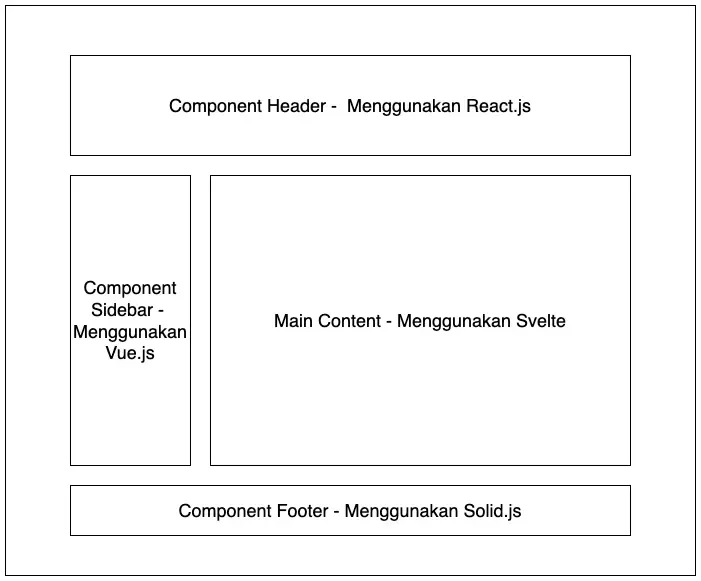
One Project, Four Libraries. Source: SantriKoding .
Here’s a real scenario: you already have a battle-tested React component library, but you want to try out Svelte for a new feature. In most ecosystems, you’d need a full migration or a separate project. With Astro, both can co-exist side by side.
There’s no extra overhead either. Astro doesn’t bundle all libraries into one giant package — only the components you actually use get built.
That said, don’t go overboard. Remember the islands principle. If you make every component interactive just because you can, you’re missing the point. Use it where it matters.
I’m not going to tell you Astro is great for everything. Because it’s not.
Building an admin dashboard where every page is full of interactive charts, filterable tables, and interdependent forms? Don’t use Astro. Next.js or SvelteKit makes more sense for that.
But if you’re building:
A personal blog. A portfolio. Library documentation. A landing page. An online magazine. A company profile.
That’s the sweet spot.
The bottom line: if most of your pages contain content that rarely changes, Astro is a really comfortable choice. It was designed from the ground up for content-focused websites, not web applications.
This blog you’re reading right now is built with Astro. And honestly, the process felt way more efficient compared to my previous experiences with other frameworks for similar projects.
No.
Seriously.
You just run npm create astro@latest, pick a template, and within minutes you have a running project. The folder structure makes sense. There’s no weird boilerplate that leaves you wondering “what is this even for?”
Writing content? Create a .md or .mdx file in the content/ folder. That’s it. It automatically becomes a page. No manual routing setup, no writing code to fetch your own files.
Want Tailwind? npx astro add tailwind. Done. Working.
The dev server is fast. It feels like refreshing plain HTML — because that’s literally what it’s doing. No waiting for JavaScript compilation first.
And astro.config.mjs? Short. Sometimes just 10-20 lines. Compare that to a next.config.js that can feel like a novel.
My reaction on first setup: “That’s it? Seriously?” Then on first build: “Why is this so fast?”
Oh, and if you want things even faster, use Bun: bun create astro@latest, bun run dev, bun run build. Noticeably quicker than npm.
Also, if you’d rather not build from scratch, there are plenty of templates at astro.build/themes. Pick one, clone, go. This blog uses one from there too.
Since Astro outputs pure HTML, the SEO foundation is solid from the start. Search engines can read your content directly — no waiting for JavaScript to execute first, which is a common problem with SPAs.
Astro also provides integrations for things that usually require extra setup:
- Sitemap — auto-generated
- RSS — just add a plugin
- Open Graph — nice thumbnails when your link gets shared
- Canonical URLs — no duplicate content penalties
- i18n — multilingual sites without the headache
All of these just need a plugin or a few lines of config.
There’s something hard to explain until you try it yourself: Astro feels calm.
Modern frameworks keep getting more complex. Longer setup times. More abstract concepts. More terminology — hydration, streaming, edge rendering, partial prerendering. You just want to build a blog, a portfolio, or a landing page, but you’re forced to understand complex architecture.
Astro goes the other way.
Its philosophy is simple: “Build the page as static HTML first. If something genuinely needs interactivity, add it there.”
Not “everything must be an app from the start.” Not “send JS first, render later.” But: static first. Content first. The rest can come after.
The effect is felt more in your mindset than in your code. Your focus shifts back to the content — what you actually want to say — not the layers of JavaScript architecture around it.
If you’re building a content-heavy website — a blog, a portfolio, documentation — and you feel like your usual framework is overkill for what you actually need, give it a shot.
Focus goes back to what matters: the content you want to write.